on Saturday, August 18, 2012

In this class we opened for the first time our lego mindstorm kits that you can buy from here and discovered what's in there.
For this session I used this html page : http://www.education.rec.ri.cmu.edu/previews/robot_c_products/teaching_rc_tetrix_preview/fundamentals/nxt_hardware/parts/parts.html
It contains all the parts within a lego mindstorm kit and clearly devised them into sections.
During the class ls with the help of their teacher must identify each part and have a scratch on the surface idea about its functions.
For example in the electronics section start to identify first each of the parts and let the ls guess what can this part do.
At the end of this class
*ls must differ between the two main components of a robot (the mechanical structure and the electronics )
*ls must identify the main electronic component (the NXT) as it's the mind of their future robots?
*ls must know what's a sensor and what's an actuator witch one is an input and witch one is an output (whitch one is for collecting informations and witch one is for executing orders) for the nxt brick.
on Wednesday, August 15, 2012

Hello,
In our second class this week, we talked about a strong concept in programming nxt based robots witch is the flowchart. So what's the flowchart and why we need to learn it ? And how could this thing help us?

Try to start with an activity and a simple question:
The activity was to stand from one place and go drink a glass of water witch placed on a table three steps away.
The question then was what actions would a person do for making this specific task?

At first kids will try to guess (with the instructor help ) the motions needed to be done by a person and give a general idea about it.
something like this: stand -->walk --> drink the water.
After they all convinced of this task dividing ask this questions:
Can we walk before we stand?
Is it possible for us to drink water while we still walking?
So kids will realize that to get to our goal witch is drinking water we need to follow the exact order of this tasks.
We have already divided our general task to three sub tasks. from go drink water to stand -->walk --> drink the water.
No The second question:
Imagine that this person is a robot what are the other sub tasks needed to be done to "stand" to "walk"  and to "drink water".
Now every ls should start to guess all the little tiny tasks that needed to be done in order to achieve the bigger tasks.
Let them test and think for 30 minutes, then take their trials and evaluate every trial.
examples of trials you could find:
stand : move both legs together
walk: move first leg-->move second leg-->move first leg --> move second leg
drink: put forward right arm--> catch the glass --> move right arm to mouth --> DRINK WATER

some trials would be a little deeper than others, but the deeper the better.
There is no course about flowchart for now, they have to get the idea about ordering and dividing tasks to smaller tasks to achieve their goals.
The design of the flowchart will be studied in parallel with other stuff in the future.
on Sunday, August 12, 2012

Hello,
In the first week start to talk about robotics in general.
Try to start by asking some questions:

what's a robot?

{The robot is a structure that do something (this is very general) .
You could try this: robots are mechanical and electrical structures that moves.
Or you can just show some robots pictures and/or videos (iRobot, big dog, nao, )
In this specific question the little students (that I will call them "ls" from now) must know that robots are not just humanoids.

what can a robot do ?

Here ls will try to guess how can the robot be useful. The general answer would be helping mom in the kitchen due to Hollywood stuff.
Show some videos, and help them guessing the functions of a robot.
A robot can move, can transport things.
A robot can walk,  can detect obstacles etc...

What they shouldn't do?

Here you must insist that robots can not replace humans in emotional situations.
Ls must realize that robots only do what we order them to do nothing more and nothing less.
Give some examples; can robot replace your mom or dad?
Can robot be happy for you ?
Can we motivate a robot to improve his abilities ?etc...

Where can we find robots?

Home, industry, medicine, military, space, games, etc....

Are we really need robots?

This is the most important questions:
try to listen to your students guessing the answer while giving them some hints.
Robots are made to replace human in dangerous spots (give the example of curiosity robot) , to do a boring work all day. Robots are used to make precise measurements where error is not tolerated and many other stuff.
So the main idea is : Robots exist to help humans and not replace them!

on Tuesday, July 31, 2012
Hello all,
I needed in one of my project to store data in a database, So as I only know Mysql I directly jump on it.
But my big problem was that I have to put all of the files in one package the thing that Mysql won't allow me to do, cause Mysql is a server database witch means that we can only connect to it and not integrate it in our application like this example . (correct me if I'm wrong please)
So I searched more and I found this little piece of jewellery System.data.sql.dll witch is a SQL based database direct link library that could be simply integrated in your C# application.
These are some tools I used to create and manage my database:
Some useful tutoriels:
using the sqlite function and send SQL queries. 
Gives a very useful class to manage data with dataGridView, inserting , updating and all those stuff
I added a method that can create data table:

using System;
using System.Collections.Generic;
using System.Data;
using System.Data.SQLite;
using System.Windows.Forms;

class SQLiteDatabase
{
    String dbConnection;

    /// <summary>
    ///     Default Constructor for SQLiteDatabase Class.
    /// </summary>
    public SQLiteDatabase()
    {
        dbConnection = "Data Source=REMOTES.s3db";
    }

    /// <summary>
    ///     Single Param Constructor for specifying the DB file.
    /// </summary>
    /// <param name="inputFile">The File containing the DB</param>
    public SQLiteDatabase(String inputFile)
    {
        dbConnection = String.Format("Data Source={0}", inputFile);
    }

    /// <summary>
    ///     Single Param Constructor for specifying advanced connection options.
    /// </summary>
    /// <param name="connectionOpts">A dictionary containing all desired options and their values</param>
    public SQLiteDatabase(Dictionary<String, String> connectionOpts)
    {
        String str = "";
        foreach (KeyValuePair<String, String> row in connectionOpts)
        {
            str += String.Format("{0}={1}; ", row.Key, row.Value);
        }
        str = str.Trim().Substring(0, str.Length - 1);
        dbConnection = str;
    }

    /// <summary>
    ///     Allows the programmer to run a query against the Database.
    /// </summary>
    /// <param name="sql">The SQL to run</param>
    /// <returns>A DataTable containing the result set.</returns>
    public DataTable GetDataTable(string sql)
    {
        DataTable dt = new DataTable();
        try
        {
            SQLiteConnection cnn = new SQLiteConnection(dbConnection);
            cnn.Open();
            SQLiteCommand mycommand = new SQLiteCommand(cnn);
            mycommand.CommandText = sql;
            SQLiteDataReader reader = mycommand.ExecuteReader();
            dt.Load(reader);
            reader.Close();
            cnn.Close();
        }
        catch (Exception e)
        {
            throw new Exception(e.Message);
        }
        return dt;
    }

    /// <summary>
    ///     Allows the programmer to interact with the database for purposes other than a query.
    /// </summary>
    /// <param name="sql">The SQL to be run.</param>
    /// <returns>An Integer containing the number of rows updated.</returns>
    public int ExecuteNonQuery(string sql)
    {
        SQLiteConnection cnn = new SQLiteConnection(dbConnection);
        cnn.Open();
        SQLiteCommand mycommand = new SQLiteCommand(cnn);
        mycommand.CommandText = sql;
        int rowsUpdated = mycommand.ExecuteNonQuery();
        cnn.Close();
        return rowsUpdated;
    }

    /// <summary>
    ///     Allows the programmer to retrieve single items from the DB.
    /// </summary>
    /// <param name="sql">The query to run.</param>
    /// <returns>A string.</returns>
    public string ExecuteScalar(string sql)
    {
        SQLiteConnection cnn = new SQLiteConnection(dbConnection);
        cnn.Open();
        SQLiteCommand mycommand = new SQLiteCommand(cnn);
        mycommand.CommandText = sql;
        object value = mycommand.ExecuteScalar();
        cnn.Close();
        if (value != null)
        {
            return value.ToString();
        }
        return "";
    }

    /// <summary>
    ///     Allows the programmer to easily update rows in the DB.
    /// </summary>
    /// <param name="tableName">The table to update.</param>
    /// <param name="data">A dictionary containing Column names and their new values.</param>
    /// <param name="where">The where clause for the update statement.</param>
    /// <returns>A boolean true or false to signify success or failure.</returns>
    public bool Update(String tableName, Dictionary<String, String> data, String where)
    {
        String vals = "";
        Boolean returnCode = true;
        if (data.Count >= 1)
        {
            foreach (KeyValuePair<String, String> val in data)
            {
                vals += String.Format(" {0} = '{1}',", val.Key.ToString(), val.Value.ToString());
            }
            vals = vals.Substring(0, vals.Length - 1);
        }
        try
        {
            this.ExecuteNonQuery(String.Format("update {0} set {1} where {2};", tableName, vals, where));
        }
        catch
        {
            returnCode = false;
        }
        return returnCode;
    }

    /// <summary>
    ///     Allows the programmer to easily delete rows from the DB.
    /// </summary>
    /// <param name="tableName">The table from which to delete.</param>
    /// <param name="where">The where clause for the delete.</param>
    /// <returns>A boolean true or false to signify success or failure.</returns>
    public bool Delete(String tableName, String where)
    {
        Boolean returnCode = true;
        try
        {
            this.ExecuteNonQuery(String.Format("delete from {0} where {1};", tableName, where));
        }
        catch (Exception fail)
        {
            MessageBox.Show(fail.Message);
            returnCode = false;
        }
        return returnCode;
    }

    /// <summary>
    ///     Allows the programmer to easily insert into the DB
    /// </summary>
    /// <param name="tableName">The table into which we insert the data.</param>
    /// <param name="data">A dictionary containing the column names and data for the insert.</param>
    /// <returns>A boolean true or false to signify success or failure.</returns>
    public bool Insert(String tableName, Dictionary<String, String> data)
    {
        String columns = "";
        String values = "";
        Boolean returnCode = true;
        foreach (KeyValuePair<String, String> val in data)
        {
            columns += String.Format(" {0},", val.Key.ToString());
            values += String.Format(" '{0}',", val.Value);
        }
        columns = columns.Substring(0, columns.Length - 1);
        values = values.Substring(0, values.Length - 1);
        try
        {
            this.ExecuteNonQuery(String.Format("insert into {0}({1}) values({2});", tableName, columns, values));
        }
        catch (Exception fail)
        {
            MessageBox.Show(fail.Message);
            returnCode = false;
        }
        return returnCode;
    }

    /// <summary>
    ///     Allows the programmer to easily delete all data from the DB.
    /// </summary>
    /// <returns>A boolean true or false to signify success or failure.</returns>
    public bool ClearDB()
    {
        DataTable tables;
        try
        {
            tables = this.GetDataTable("select NAME from SQLITE_MASTER where type='table' order by NAME;");
            foreach (DataRow table in tables.Rows)
            {
                this.ClearTable(table["NAME"].ToString());
            }
            return true;
        }
        catch
        {
            return false;
        }
    }

    /// <summary>
    ///     Allows the user to easily clear all data from a specific table.
    /// </summary>
    /// <param name="table">The name of the table to clear.</param>
    /// <returns>A boolean true or false to signify success or failure.</returns>
    public bool ClearTable(String table)
    {
        try
        {

            this.ExecuteNonQuery(String.Format("delete from {0};", table));
            return true;
        }
        catch
        {
            return false;
        }
    }
    public bool CreateTable(String TableName)
    {
        try
        {
            this.ExecuteNonQuery("CREATE TABLE IF NOT EXISTS " + TableName + " ( id INTEGER NOT NULL PRIMARY KEY AUTOINCREMENT, name VARCHAR(100) NOT NULL);");
            return true;
        }
        catch (Exception ex)
        {
            MessageBox.Show(ex.ToString());
            return false;
        }
    }
}


on Friday, July 6, 2012
Hello,
you may want sometimes to save data that are too much to handle by your poor little pic, well you may thought of using an external eeprom to save all your data their,
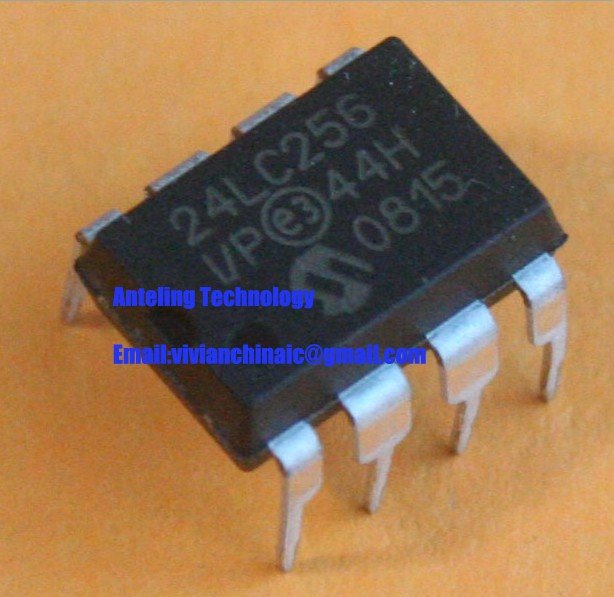
In this tutoriel, I'm going to tell how to interface the 24LC256 eeprom with a 16F887 pic microcontroller.

I2C is a protocol that can allow multiple slaves and multiple masters to be connected in the same network, and that's pretty awsom ^^, most of the time there is only one master and many slaves, but in our case there will be one master (our PIC 16F887) and one slave our (24LC256 eeprom).
The master can communicate with only one slave at a time so how can he make a difference between his slaves?
well that's easy every slave has its unique address in the network for example our 24LC256 address has a 7 bit address that's equal to in binary 0B1010A1A2A3,
A master in a I2C network can read xor write it can't do both of them at the same time, so you may wonder how the slave would know if the master need to right or read from it,
well that's simple if the master want to write in the eeprom it sends 0XA0 and if it want to read it sends 0XA1, in other terms the LSB is the bit responsible for reading or writing.

wiring The 24LC256 EEPROM

A1 A2 and A3 are wired to the ground so our eeprom address is 0B1010000
Wp it's a bit for writing protection or read only, I'm not sur just wired to the ground.
SDA is the pin responsible for sending and receiving data,
SCK is the serial clock
We must use 2 pull up resistor for SDA and SCL (in proteus isis use the pull up resistor model)

Writing and reading from the EEPROM

we will store a data in a specific address then we are going to read data from that address.
unsigned char i = 0;
char txt[4];
void rc(){
     uart1_write(10);
     uarT1_write(13);
}
void main(){
  uart1_init(9600);
  I2C1_Init(100000);
  uart1_write_text("initialize I2C communication");rc();
  I2C1_Start();
  uart1_write_text("Start I2C communication");rc();
  I2C1_Wr(0xA0);
  delay_ms(10);
  uart1_write_text("write eeprom address");rc();
  I2C1_Wr(0x00);
  delay_ms(10);
  uart1_write_text("write low address");rc();
  I2C1_Wr(0x00);
   delay_ms(10);
   uart1_write_text("write high address");rc();
  I2C1_Wr(26); //donnée à écrire
  delay_ms(10);
  uart1_write_text("send to be stored");rc();
  I2C1_Stop();
  uart1_write_text("Stop I2C communication");rc();
  Delay_100ms();
  I2C1_Start();
  uart1_write_text("Start I2C communication");rc();
  I2C1_Wr(0xA0);
    delay_ms(10);
    uart1_write_text("write eeprom address");rc();
  I2C1_Wr(0x00);
     delay_ms(10);
     uart1_write_text("Start I2C communication");rc();
  I2C1_Wr(0X00);
  delay_ms(10);
  uart1_write_text("write low address");rc();
  I2C1_Repeated_Start();
  uart1_write_text("write high address");rc();
  I2C1_Wr(0xA1);
  delay_ms(10);
  uart1_write_text("read eeprom address");rc();
  i=I2C1_Rd(0);
  uart1_write_text("read stored data");rc();
  I2C1_Stop();
  uart1_write_text("Stop I2C communication");rc();
  bytetostr(i,txt);
  uart1_write_text(txt);rc();
}

I hope that was clear, don't stop sharing!!


on Friday, June 1, 2012
So here I am founding my self learning the NXT lego mindstorm kit for robotics to teach some robotic lessons to some kids with my friend Helmi.

I didn't play with lego when I was young and I didn't make any robot neither but I found that learning such things in early age is just great cause robotics include many disciplines like mathematics physics algorithms mechanics and even chemistry in some cases so for a child this is a great opportunity to boost his way of thinking perception searching for information and finding solutions without mentioning increasing his self confidence and sense of innovation and creation with such a simple tool simple tasks but with amazing results.
Sure I will post some of NXT robotics experience. Till that day keep sharing :)